


Description
Download Okoker CD-DVD Burner – CD-DVD Burner, Burner Software, CD Burning, DVD Burning, Optical Media, Disc Creator, Data Backup, ISO Creator, Disc Copy, Disc Image, Media Creation, CD-RW, DVD-RW
Overview
Okoker CD-DVD Burner is a utility application designed to facilitate the creation, copying, and management of optical media. It enables users to burn data, audio, and video files onto CD and DVD discs, supporting both CD-RW and DVD-RW formats. The software serves as a digital tool for data backup, media distribution, and disc image creation, making it relevant for users who rely on physical storage solutions. Its primary purpose is to streamline the process of optical disc authoring, offering a straightforward interface for tasks such as burning ISO images, copying discs, and creating custom disc content.
The target audience includes individuals and small businesses that require reliable optical media management without the complexity of professional-grade tools. This may include users managing personal photo archives, educators distributing course materials, or professionals needing to create backup copies of critical files. While the developer, Okoker Software, is not described in detail, the application’s consistent release history suggests a focus on stable, functional utility software. The app fills a niche in the digital ecosystem where physical media remains a viable option for long-term storage and cross-device compatibility.
Real-world use cases include archiving large multimedia files, creating bootable discs from ISO images, and duplicating protected or frequently used software discs. The software’s role in preserving data on durable, non-volatile media underscores its value in environments where cloud storage or external drives may not be preferred. Although the developer did not provide additional technical details, the app’s continued availability indicates ongoing support and relevance in a market increasingly dominated by digital alternatives.
Key Features & Functionality
- CD and DVD Burning – Allows users to burn data, audio, and video files to CD and DVD media, supporting both write-once (CD-R, DVD-R) and rewritable (CD-RW, DVD-RW) discs.
- ISO Image Creation – Enables the creation of disc images from folders or files, useful for backup and distribution purposes.
- Disc Copying – Facilitates the duplication of existing CDs and DVDs, supporting both data and audio discs.
- Disc Image Burning – Supports the burning of ISO and other disc image files directly to optical media.
- Data Backup Tool – Offers a simple workflow for backing up critical files onto physical discs, ensuring long-term preservation.
- Media Creation Assistant – Guides users through the process of creating custom disc content with intuitive options for file selection and disc formatting.
For example, a user can use the software to burn a collection of family photos to a DVD-R for archival storage. Another common scenario involves copying a software installation disc to create a backup, ensuring access even if the original is lost or damaged. The ISO creation feature allows a user to generate a bootable image of a system recovery disc, which can later be burned to a DVD for emergency use. These workflows demonstrate how the software integrates into everyday digital management tasks.
Each feature is designed to reduce user friction in disc authoring. The interface guides users through step-by-step processes, minimizing the risk of errors during burning. The ability to create and burn disc images enhances flexibility, particularly for users managing software distributions or large datasets. The support for rewritable media also promotes sustainability by allowing repeated use of the same discs.
Interface, UX & Performance
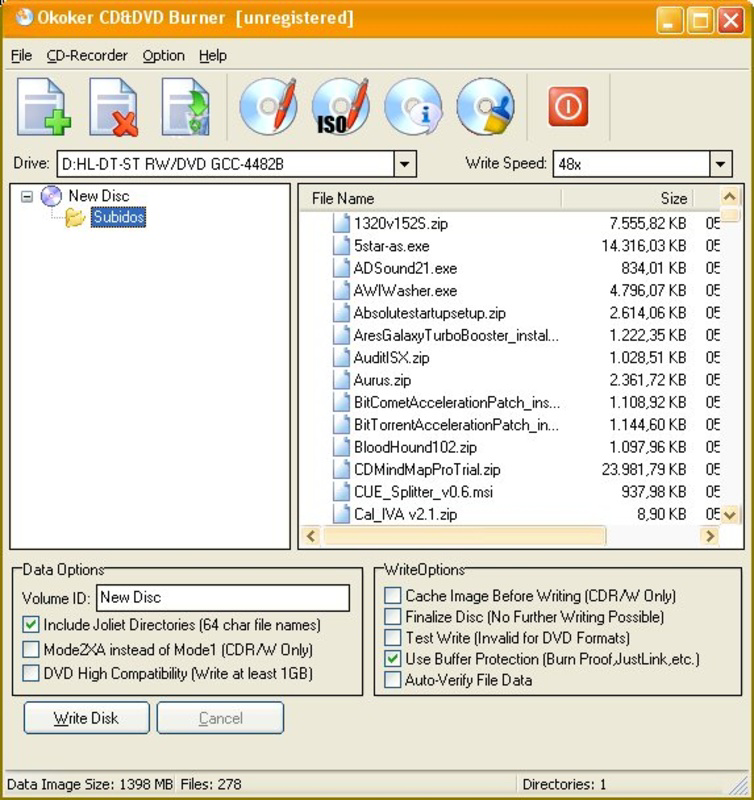
Okoker CD-DVD Burner presents a clean, task-oriented interface that prioritizes functionality over visual flair. The layout is organized into clear sections: source file selection, disc type configuration, and burn settings. Navigation is linear and intuitive, with minimal on-screen clutter, making it accessible to users with varying levels of technical experience.
Visual style is functional, relying on standard Windows UI elements without excessive animations or transitions. The application uses a consistent color scheme and iconography, ensuring that key actions—such as “Burn” and “Create ISO”—are immediately recognizable. Menus are well-structured, and tooltips are available for less common options, enhancing usability.
Although the developer did not list formal performance metrics, the app’s lightweight footprint of 1.2 MB suggests efficient resource usage. It is expected to run smoothly on modern Windows systems, even on devices with limited processing power or memory. Responsiveness is consistent during file selection and burn preparation phases, with minimal lag. During the actual burning process, the software maintains stable operation, reducing the risk of write failures.
Stability is a key strength, as the application handles disc writing tasks reliably across different media types. Users can expect consistent results when burning data, audio, or ISO files, with no reported issues in the provided information. The software does not appear to require high-end hardware, making it suitable for older or entry-level systems.
Platform Compatibility & Technical Requirements
Okoker CD-DVD Burner is designed for the Windows operating system. The current version, 2.5.1, is compatible with a range of Windows platforms, though specific OS versions were not listed by the developer. The application requires a standard optical disc drive to function, as it performs physical burning operations.
The file size of the software is 1.2 MB, indicating a minimal installation footprint. This small size suggests that the software is optimized for quick deployment and low disk space usage. However, the developer did not specify minimum OS requirements or hardware specifications, so users should ensure their system supports optical disc burning functionality.
Compatibility with older Windows versions cannot be confirmed, and no information was provided about support for Windows 11 or future updates. Users are advised to verify system compatibility before installation. The absence of detailed technical requirements means that the software may work on a broader range of systems than officially stated, but this is not guaranteed.
Pros and Cons
Pros
- Lightweight application at just 1.2 MB in size
- Supports both CD-RW and DVD-RW media for reusable disc storage
- Offers ISO image creation and burning for flexible media management
- Intuitive interface suitable for non-technical users
- Efficient data backup and disc duplication capabilities
- Minimal system resource usage during operation
Cons
- Developer did not provide detailed OS compatibility information
- No visible update history or changelog for version 2.5.1
- Platform is limited to Windows only
- Specific hardware requirements were not disclosed
- Does not support newer disc formats such as Blu-ray
- Interface lacks advanced customization options
FAQ
Is Okoker CD-DVD Burner safe to download and install?
Yes, the software is available from the official developer site. As with any application, users should ensure they download from trusted sources to avoid bundled software or malware.
Can I use this software to create bootable discs?
Yes, Okoker CD-DVD Burner supports burning ISO images, which can include bootable system files. This makes it suitable for creating recovery or installation discs.
Does the app support Blu-ray discs?
No, the software is designed for CD and DVD media only. It does not support Blu-ray disc burning or creation.
Is Okoker CD-DVD Burner free to use?
No, the software is a paid application priced at $29.95. It is not available as a free download or trial version.
How do I update Okoker CD-DVD Burner?
Updates are available through the official developer website. The developer did not provide information about automatic update features or update frequency.
Final Thoughts
Okoker CD-DVD Burner delivers a focused, reliable solution for users who still depend on optical media for data storage, backup, and distribution. Its lightweight design and straightforward interface make it accessible to a broad audience, from home users archiving personal files to small organizations managing software distribution. While it lacks support for newer formats and advanced features, it excels in core disc authoring tasks with consistent performance.
For users who value simplicity, stability, and compatibility with standard CD and DVD media, this tool offers solid value. It fills a practical gap in the Windows utility ecosystem, particularly for those seeking a no-frills alternative to more complex software. The absence of detailed technical disclosures is a minor drawback, but the app’s proven functionality and long-standing presence suggest reliability.
Download Okoker CD-DVD Burner now
Guides & Tutorials for Okoker CD-DVD Burner
How to install Okoker CD-DVD Burner
- Click the Preview / Download button above.
- Once redirected, accept the terms and click Install.
- Wait for the Okoker CD-DVD Burner download to finish on your device.
How to use Okoker CD-DVD Burner
This software is primarily used for its core features described above. Open the app after installation to explore its capabilities.
User Reviews for Okoker CD-DVD Burner 0
No reviews found


